Threshyr is a time tracker for Windows and macOS that I designed and built myself, from product strategy and UX to the desktop app. Its core design decision is that you never touch a timer: it records your work in the background, keeps everything on your machine, and refuses to guess when it isn’t sure. This post is about the product and design choices behind it.
The problem: trackers that fail on a normal day
In October 2021 I found three active time tracker subscriptions on one credit card statement. One I had abandoned after two weeks, one I had re-subscribed to for a new client, and one I had installed and then ignored. It was the fourth time in five years I had gone looking for a replacement.
The pattern was always the same, and it was rarely about visual design. Stopwatch trackers assume every task starts with a clear intention and an uninterrupted block of time. A real day is full of interruptions, so the timer gets forgotten, the gaps get guessed, and the totals stop being trusted. Automatic trackers fix the memory problem but guess categories badly, so you spend Friday correcting them. And monthly pricing keeps charging through the quiet months, until you cancel and lose your history.
Four requirements, used as design principles
I wrote down what a tracker would need to do for me to keep it, and used those four points to judge every decision:
- Zero operational memory: capture work automatically, with no start buttons, stop buttons or mode switches.
- Uncompromised accuracy: keep client projects cleanly separated, and hold back anything uncertain for you to assign instead of inventing a category.
- Local data ownership: no account, no email address, no cloud server.
- Sustainable pricing: one yearly licence, with no monthly billing traps or usage tiers.
Decision 1: no timer at all
Threshyr runs quietly in the background and notices when you step away from your desk, pausing on its own. Removing the timer removes the most common failure, because there is no button to forget.
Decision 2: don’t guess, learn
Categorisation runs on the device, with local rules. Hundreds of common apps and domains come pre-assigned, and project tagging rules separate client work by app name, domain and keywords in window titles. When you correct something, Threshyr saves the correction as a permanent rule, so next week needs less fixing than this week. When it can’t tell, it holds the activity back for you to assign.
It also explains itself. When Threshyr assigns an activity to a project, the details panel says why in a plain sentence, and admits when that reasoning rests on incomplete context, for example when an app never reports a window title. Reassigning offers four clear scopes: this activity only, this and future, this and all past, or everything.
Decision 3: privacy as a constraint, not a setting
A tool that watches your screen should not need to know who you are. Threshyr has no account, no email and no password. It works fully offline, logs no keystrokes, takes no screenshots and sends no telemetry. Because offline is the normal state, a failed background update check shows no error banner. If you check for updates manually, you still get an answer either way.
Decision 4: show the shape of the day, not just a total
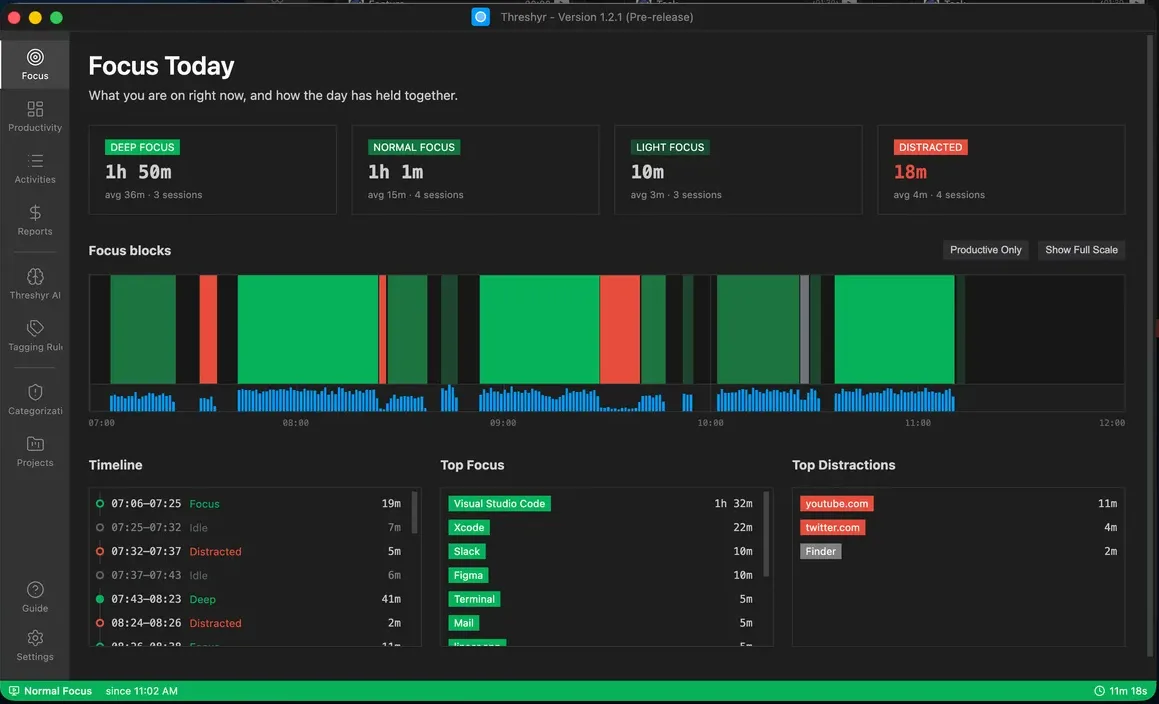
Four hours of unbroken work and forty six-minute fragments add up to the same total, but they are very different days. So the main view shows focus in blocks with four weights:
- Deep Focus: 25 minutes or longer, drawn at full strength.
- Normal Focus: 5 to 25 minutes.
- Light Focus: under 5 minutes, counted and drawn faintly instead of thrown away.
- Distracted: active time in apps or sites outside your productive categories.
The blocks on the chart are shaded to match their summary cards, so you can read the day at a glance without a legend.
Decision 5: never punish thinking
Threshyr measures how actively you use the keyboard and mouse, and reports it as engagement, but it never uses input rate to disqualify a focus block. Reading documentation, thinking through a problem or sketching on paper produces almost no input. A tracker that demanded clicks would delete 25 minutes of deep reading and keep three minutes of chat messages, which is the opposite of what a focus tool is for.
Decision 6: be honest about the gaps
Most trackers treat any time away from the machine as one state. Threshyr separates two:
- Idle: Threshyr was running and recorded you away from the keyboard.
- Off: nothing was recorded because the machine was asleep, locked or off.
Without that distinction, closing your laptop for the night would turn into eight hours of “idle” on your timesheet. The status bar follows the same rule and shows your real state, such as Deep Focus since 10:31, instead of the name of whichever window is in front.
Deciding who it is not for
Part of designing a focused product is saying no. Threshyr is built for one person looking at their own screen, so it deliberately has no team monitoring, no customer invoicing or payments, no Linux or mobile apps, and no open-source codebase. Saying so plainly, and pointing people to better-suited tools, is better than letting them find out after they install it.
Designing and building it myself
I did the product strategy and the UX and UI design, and I built the Windows and macOS desktop app. Being the designer and the builder shortened every loop: an idea could go from a sketch to something I used the same day. It also made trade-offs honest, because I paid for every design decision in build time too. If you are curious about that way of working, I wrote about it in Figma to Code.
Key takeaways
- Find the real failure point first. For trackers it was memory and trust, not visuals.
- Turn your requirements into principles and judge every decision against them.
- When a system is unsure, ask instead of guessing, and explain its reasoning.
- Show the structure of the data, not only the total.
- Name the cases your product is not for.
Threshyr is live at threshyr.com, and it is the first project on my Work page.
All posts