Dark mode for a dashboard is not an inverted light theme. Charts, tables and status colours all carry meaning, and that meaning has to survive the switch. When I redesigned CapitalStake’s investment analytics platform, we went further than one dark theme and designed three, because people use a tool like that all day, in different light and for long stretches.
Why dashboards need dark mode more than most products
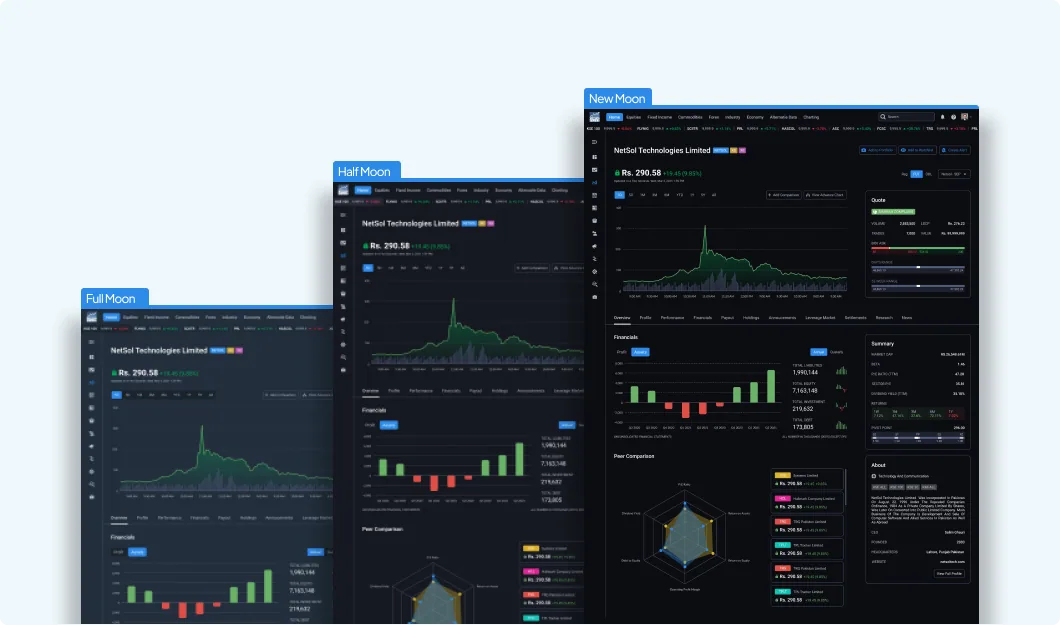
Financial analytics tools are open throughout the trading day, and looking at the same bright screens for hours leads to fatigue. A dark theme is not decoration for these users; it is part of making the product comfortable to work in. That is why the CapitalStake platform got three dark modes, named after the moon’s phases: Full Moon, Half Moon and New Moon, from the lightest dark to the darkest.
1. Don’t start from pure black
Pure black backgrounds with pure white text create very high contrast, which can feel harsh over a long session, and they leave you no darker shade to show depth. Start from a dark grey or a dark tinted blue, and keep the darkest options for people who actively want them. That is the role New Moon plays in the CapitalStake set.
2. Show depth with lighter surfaces, not shadows
Shadows barely show on a dark background. Instead, raise important surfaces by making them slightly lighter than the page: page background, then cards, then menus and pop-overs, each a step lighter. Dashboards are made of nested panels, so this hierarchy does a lot of work.
3. Re-tune every data colour
A colour that reads well on white can glow or disappear on a dark background. Each chart series, heat-map step and category colour needs checking again in every theme. Usually that means slightly less saturated, slightly lighter versions of the light-theme colours, with enough difference between neighbouring series that they can still be told apart.
4. Keep signal colours meaning the same thing
In finance, green and red mean up and down. Those meanings must not change between themes, even when the exact shades do. Check them against each background, and never rely on colour alone: pair them with an arrow, a sign or a label, so the data stays readable for people with colour vision deficiencies.
5. Check contrast in every theme
Each theme needs its own contrast check, for body text, small numbers in tables, axis labels and disabled states. Secondary text is the usual casualty: a grey that was fine on white is often too faint on a dark surface. Test with real data at real sizes, not with a few large headings.
6. Treat themes as tokens, not as separate designs
Three themes only stay manageable if they are built on the same component set. Name colours by role, such as surface, raised surface, text, muted text, positive and negative, and let each theme supply its own values. A modular component system, like the one built for CapitalStake, is what makes several themes practical to maintain.
7. Let people choose
There is no single right darkness. Lighting, screens and personal comfort vary too much. Offering a small set of dark themes, alongside other customisation such as theme colours and custom screens, let CapitalStake’s users pick what suited their own day.
Key takeaways
- Design dark mode for comfort over long sessions, not only for looks.
- Start from dark grey or tinted dark, not pure black.
- Use lighter surfaces to show depth.
- Re-check every chart and signal colour, and never rely on colour alone.
- Run contrast checks per theme, especially for small and secondary text.
- Build themes from role-based tokens on one component set.
Read more lessons from the same project in Designing an investment analytics platform: 7 lessons from CapitalStake, or see the CapitalStake Analytics case study.
All posts